Choosing a laptop for IIT Roorkee is easier when you separate four decisions: the software you must run, the projects you expect to complete, what you will carry each day, and the full amount you can spend. This guide connects official software requirements with an original buying worksheet, so you can compare a new machine, a refurbished laptop or an upgrade to the computer you already own. It is independent advice from Computer Care in Roorkee, not an institute-approved specification or a list of paid product picks.
Before you decide
- Use your actual application list and release numbers; branch names alone do not define a computer requirement.
- The sourced chart compares minimum and recommended RAM—not measured speed or a universal specification.
- Inspect upgradeability, OS support, battery, warranty and total cost on the exact model.
- Bring your software list, complete budget and existing laptop details to the shop near Century Gate.
What students are actually asking
A public IITR discussion about a mechanical-engineering laptop asks whether a graphics card is necessary and how to choose within a budget. Another question from an incoming IITR design student asks when a laptop is needed. Those are useful questions, but neither discussion establishes an official requirement or a market-wide trend.
The practical answer begins before a brand shortlist. Ask your instructor which applications, versions and plug-ins you need this semester; whether assessments require local execution; and which campus facilities you can use. Then separate essential work from optional gaming or personal projects. Buying the largest specification you can afford can still be the wrong decision if the required software does not run on that platform.
We have not measured IITR search volumes, surveyed the student population or benchmarked laptops for this article. The recommendations below are a decision framework; the numeric software data comes from the publishers linked beside the table.
Check IIT Roorkee resources before paying for software
The official Institute Computer Centre software page lists engineering, scientific, creative and development software, including MATLAB R2026b, Autodesk educational access, ANSYS, Adobe Creative Cloud and other tools. This shows why one generic “engineering laptop” label is inadequate: different tools and project types have different requirements.
A listing does not guarantee a personal-device licence, unlimited off-campus access, access for every student or a particular installation method. Confirm your own eligibility and the current instructions through the institute. Ask whether the department expects Windows, macOS or Linux, and whether a specific package depends on a network licence, campus network or remote resource. Computer Care cannot issue institute access or override its rules.
Keep a four-column note: application; required release; operating system; how you will access it. Add any USB instruments, lab boards, printer drivers or course-specific extensions. This note is more useful to a seller than your branch name alone and prevents spending twice on the wrong platform or an unnecessary licence.
Published RAM requirements: the actual numbers
The following Windows figures were checked on 8 November 2026. They describe software publishers’ installation/workload guidance. They do not measure performance, prove that a particular laptop is fast, or add up to a single required RAM total. Photoshop’s recommended figure is a lower bound; the Android installation guide is a changing document.
| Application and scope | Minimum | Recommended | Primary source |
|---|---|---|---|
| MATLAB R2026b / Windows | 8 GB | 16 GB | Publisher requirements |
| Photoshop 27.x / Windows | 8 GB | 16 GB or more | Publisher requirements |
| Android Studio / Windows | 8 GB | 32 GB | Publisher requirements |
| Studio + Emulator / Windows | 16 GB | 32 GB | Publisher requirements |
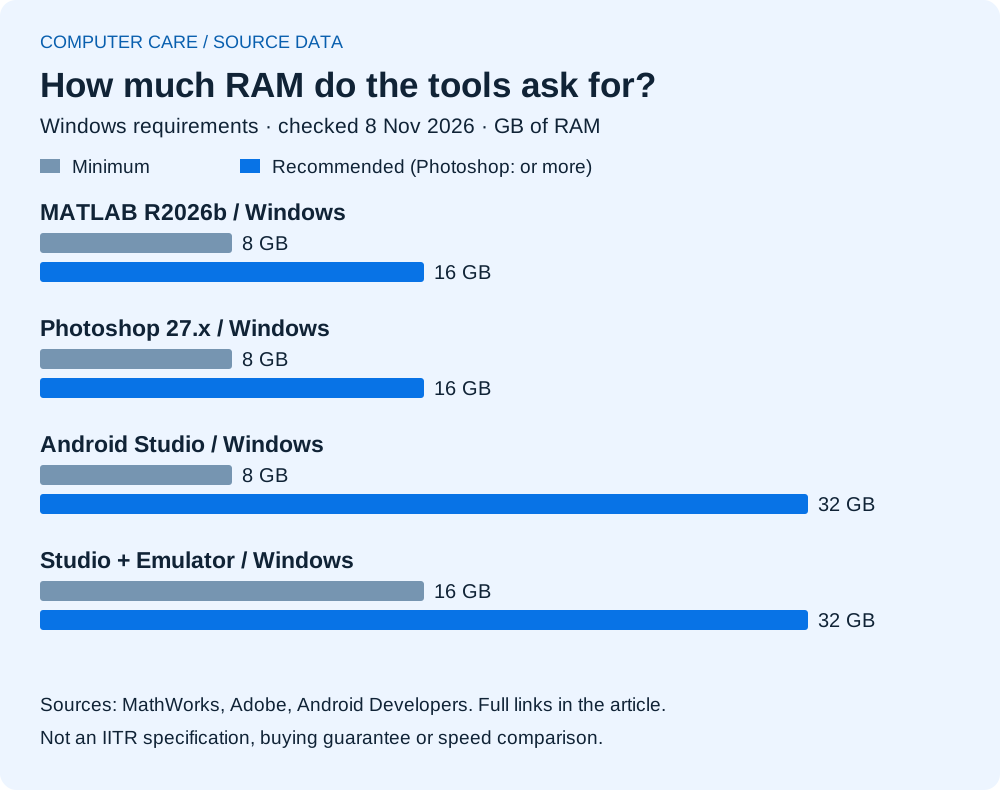
Our interpretation: first identify the heaviest application you actually need, then leave room for your normal multitasking. A minimum specification is a compatibility floor. Large files, multiple applications, virtual machines and future projects can change the sensible configuration. Avoid treating a bar twice as long as evidence of twice the performance; it represents memory capacity only.
Match the configuration to the work, not the branch label
| Your work | What to establish | What to compare in a demonstration |
|---|---|---|
| Documents, classes and introductory coding | Browser tabs, editor, video calls and required OS | Keyboard, display readability, responsiveness with normal apps open |
| Android development | Whether you will use a local emulator or a physical test device | The exact development setup and publisher requirements |
| CAD and engineering simulation | Application, release, model size, plug-ins and access route | Representative course files, supported graphics and sustained behaviour |
| Design and media | Image/video dimensions, tools, colour needs and external displays | A real project, screen suitability, RAM and available storage |
| Research, datasets or virtual machines | Dataset size, guest systems and approved remote resources | Memory capacity, storage, platform support and your actual workflow |
For coding, name the tools rather than saying “CSE laptop”. A text editor and introductory exercises are different from local mobile emulation, multiple containers or large data work. For CAD, the software family and version matter; use Autodesk’s version-specific requirements rather than a seller’s generic engineering badge. For design, ask whether your deliverables depend on a display or application feature that the proposed device actually provides.
A demonstration should resemble your work. Bring a non-confidential project file you are allowed to share, state the software version, and ask what is installed. A promotional video, an empty desktop or a benchmark from a different configuration does not establish how your project will behave.
Windows, Mac or Linux: check the complete chain
Choose the platform after checking every essential application, plug-in and peripheral. The fact that a product has a Mac version does not establish that all Windows features or course add-ons are present. Similarly, the availability of Linux tools for programming does not establish support for every examination application, CAD workflow or printer.
If you plan to rely on a virtual machine, emulation, dual boot or a remote desktop, verify the actual supported setup and any licence restrictions before purchase. Include the memory and storage used by that arrangement. Do not buy a device on the assumption that someone will later make unsupported software work.
For a Windows machine, Microsoft’s Windows 11 requirements include a supported processor, TPM 2.0 and Secure Boot-capable firmware. An installed copy alone is not proof of supported hardware. Standard Windows 10 support ended on 14 October 2025; any extended-update arrangement has separate eligibility and conditions. Ask for an explicit OS-support plan on an older machine rather than assuming that a RAM upgrade resolves platform compatibility.
Do you need a dedicated graphics card?
There is no evidence-based answer that applies to every IIT Roorkee student. Start with the graphics requirements of your applications and projects. Ordinary written work and some programming workflows do not automatically justify a dedicated GPU. Graphics-heavy design, rendering, simulation or a specific local-computing workload may make it relevant, but the GPU must be supported by the software.
Compare exact GPU models, memory, cooling and the full laptop configuration. A familiar GPU badge does not make two machines equivalent. Ask how the device behaves on your intended power source, whether the display and external outputs suit your setup, and whether its charger and size suit daily travel. Balance the capability you will use against the complete cost.
Gaming is a valid personal requirement; record it separately from compulsory coursework. That makes it easier to understand which spending is necessary for classes and which spending buys something you personally value. Avoid a seller’s claim that every engineering student needs the same gaming machine.
RAM, SSD and upgradeability: inspect the exact model
RAM holds active work; storage holds your files and installed software. More storage is not the same as more working memory. Before buying, ask what is installed, what is replaceable and what the manufacturer supports. Some designs have soldered memory or different slot arrangements within the same product family.
Request a quote with the complete processor model, RAM configuration, SSD model/capacity and any dedicated graphics. “i5, 16 GB, SSD” leaves too much unspecified for a fair comparison. Check whether an advertised future upgrade requires replacing an existing part, whether labour and data migration are included, and whether the total exceeds a better configuration bought at the start.
Use our RAM, SSD and laptop parts guide for the compatibility worksheet. Buying an incompatible part because it looks similar can leave you with an expense that does not solve the original problem.
Build a college-day test, not just a specification sheet
Try the keyboard, trackpad, display and webcam. Read a page of text at a normal distance. Carry the laptop with its actual charger rather than comparing laptop-only weight. Check the ports you need for storage, a monitor or a presentation and include the correct adapters in your budget.
Battery advertising is measured under particular conditions. Ask which conditions were used and test a realistic workload when possible. A short shop test can reveal obvious faults but cannot establish all-day runtime or future battery life. For a used machine, battery condition and the cost of a compatible replacement deserve their own line in the comparison.
For hostel use, plan a firm desk surface, a safe place for cables, separate backup storage and the accessories you need for classes. An external keyboard or mouse may suit a desk; portability may matter more if the device moves constantly. A desktop should be compared as a complete workstation including monitor, networking, keyboard, power equipment and a way to work away from the desk.
Use a complete-cost worksheet before choosing new or refurbished
| Cost item | New option | Refurbished option | Keep and upgrade |
|---|---|---|---|
| Device or proposed repair | Exact configuration + quote | Exact unit + quote | Diagnosis + parts + labour |
| Essential accessories | Charger, adapters and peripherals | Included and missing items | Any replacement accessories |
| Software and migration | Eligibility/licences + setup | Supported OS + setup | Backup + agreed migration |
| Condition and support | Written warranty/exclusions | Battery, faults, return terms | Other ageing parts + work warranty |
| Your complete total | Add confirmed figures | Add confirmed figures | Add confirmed figures |
A refurbished laptop may make sense if the actual unit fits the workload, condition and support requirements. Inspect it using the refurbished laptop checklist. A newer low-cost machine and an older higher-tier machine solve different problems; compare the specific alternatives rather than declaring a category the universal winner.
If you already own a laptop, first identify the limitation. A supported memory or storage upgrade can address a particular bottleneck, while a damaged hinge, unsupported operating system or workload beyond the platform needs a broader decision. Ask for the diagnosis and complete quote before spending. This article intentionally has no invented “best laptop under ₹X” list or unverified discount.
What to bring to Computer Care near IIT Roorkee
Bring your application list, maximum complete budget, a model/configuration you are considering, and the details of your existing computer if you want to compare repair with replacement. Explain an upcoming submission date at the start. Ask what is in stock, what can be demonstrated, what the written quote includes and what support applies.
Computer Care is at 1st Floor, Nanda Building, 19 Civil Lines, near IIT Roorkee’s Century Gate, Roorkee. Open daily, 9am–7pm. Call +91 99278 65808 before travelling if you need a specific model or component; the secondary number is 084454 51966. The shop is independent of IIT Roorkee and is outside the campus.
Explore new laptops and desktops, refurbished laptops and student computer support. Prices, stock, student offers, warranty and timing need direct confirmation for your requirement.
SAVE FOR LATER
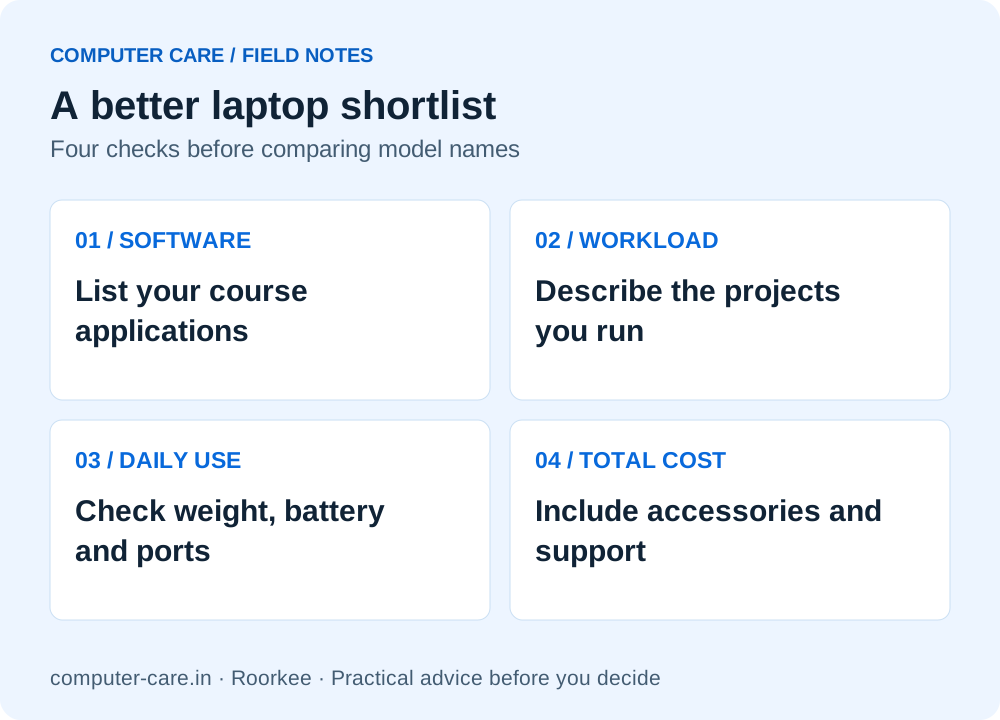
A better laptop shortlist
YOUR QUESTIONS, ANSWERED
Useful details before you call
What is the best laptop for IIT Roorkee students?
There is no verified universal model. Start with your course applications, required OS, project size, daily portability and complete budget. Compare exact configurations and written support terms using this guide.
Is 8 GB RAM enough for engineering?
Some publishers list 8 GB as a minimum, while their recommendations can be 16 GB or 32 GB. The chart identifies the software and scope. Your actual projects and multitasking decide whether a configuration is suitable.
Does every IITR mechanical student need a dedicated GPU?
No institute-wide rule is established by this article. Confirm the actual CAD, simulation and course requirements with your department. A public student discussion is not official purchasing guidance.
Can I buy a Mac for coding and engineering?
Only after checking the exact applications, plug-ins, hardware interfaces and required assessment workflow. Do not assume an emulated or virtualised Windows setup is supported.
Should I buy before joining or wait for course guidance?
Ask for the department’s current guidance and consider what you already have. If your immediate work is covered, confirming the workload before a major purchase can avoid an unsuitable configuration. This is not an official instruction to delay a required purchase.
Can I upgrade RAM after buying?
Only if that exact model supports it. Confirm soldered memory, slots, supported capacity and module specification before relying on a future upgrade.
Is a refurbished laptop suitable for college?
It can be if the actual unit passes condition checks and fits software, battery, budget and support needs. Compare the complete cost with a new option and an upgrade to your present machine.
Does Computer Care guarantee a fixed student discount?
No percentage or fixed offer is promised here. Contact the shop with your requirements to confirm current stock, prices and any available student offer.
Sources & further reading
Research checked 8 Nov 2026. Community and directory questions help identify topics; technical guidance comes from the named documentation. They are not evidence of Computer Care prices, inventory or service terms.
- IIT Roorkee ICC: official software resources ↗Primary documentation; checked 8 Nov 2026
- Android Developers: Studio and Emulator installation requirements ↗Primary documentation; checked 8 Nov 2026
- MathWorks: MATLAB R2026b Windows requirements ↗Primary documentation; checked 8 Nov 2026
- Adobe: Photoshop 27.x desktop requirements ↗Primary documentation; checked 8 Nov 2026
- Microsoft: Windows 11 hardware requirements ↗Primary documentation; checked 8 Nov 2026
- Microsoft: Windows 10 end of standard support ↗Primary documentation; checked 8 Nov 2026
- Autodesk: version-specific AutoCAD requirements ↗Primary documentation; checked 8 Nov 2026
- IITR community: mechanical-engineering laptop question ↗Question discovery only; no survey, official requirement or verified technical advice
- Incoming IITR design student: when to buy a laptop ↗Question discovery only; not representative demand data